
myHealthButton
Page Navigation
The myHealthButton and myHealthPortal applications are available to members of Michigan Medicaid, Healthy Michigan Plan, MIChild, and Children’s Special Health Care Services (CSHCS). It puts control of your health care benefits and services in your hands by providing real-time access instantly and securely. Below you will find written instructions and helpful videos on how to register and use the applications and informational resources. These resources are intended for both users of the applications and those who may be assisting them.

Resource Library
Register for myHealthButton and myHealthPortal and find additional application resources in the Resource Library.

Training
We are engaging organizations statewide in myHealthButton training. Find out more about the benefits of this application and request training for your team.
myHealthButton Key Features
Key Features:
- Find a doctor
- Add a member
- View/Request a mihealth card
- View immunization records
- Review insurance benefits
- Cost share
- Complete Health Risk Assessments for HMP
- Children’s Special Health Care
- Service (CSHCS) diagnoses, providers, and payments
- Review Medicaid information
- Request corrections
- Review all claims sent to Medicaid
For additional information on how to register and what you’ll need, visit our resource page.
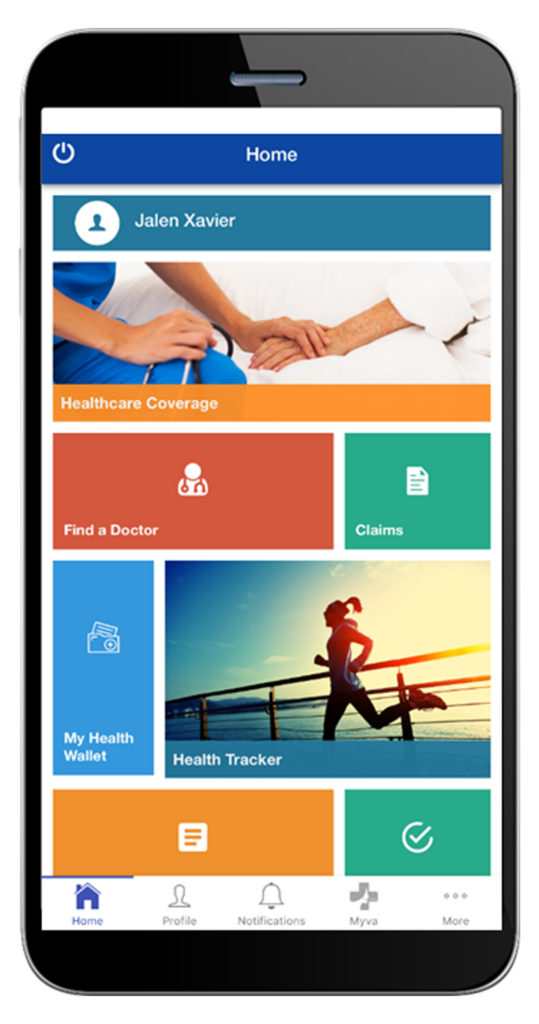

Download the myHealthButton
App Today and Get started


Click on a title or “+” icon to see more information.
myHB FAQ
General Information
Can I still access the applications if my Medicaid eligibility changes to inactive?
Yes, if you signed up for the apps when active, but are now inactive on Medicaid, you are still able to login and see their info based on when they were active.
Can I view my family member’s (son/daughter/parent/etc.) information?
If you are known within the MDHHS system as a Responsible Party, Guardian, Guardian Agency or Case Head, you may view that person’s info by adding them to your account. Learn how to Add a Member.
Are there other languages available through the applications?
In myHealthPortal, the language of the application can be changed to Spanish, but not in myHealthButton. Learn how to change the language to Spanish.
How do the applications make sure that only the correct people have access to the information?
To add an account in the applications, a member must have an accepted “relationship” to the account to be able to view their info.
CHAMPS has “checks” in place to stop any outside contact with protected records. myHealthButton & myHealthPortal use these “checks” in the applications. A record would not be shown in myHealthButton & myHealthPortal if it were protected.
How do I learn what “relationship” I am when adding a member in the applications?
Case relationships in the myHealthButton & myHealthPortal are shown in CHAMPS. When you add other members to your account, the only “relationship” that will work is the relationship that is what is already in CHAMPS.
If you do not know the relationship when adding other members, contact your caseworker or the beneficiary hotline at 1-800-642-3195.
What is the difference between myHealthButton & myHealthPortal and MI Bridges?
MI Bridges helps Michigan residents apply for benefits, manage their case, and find resources. myHealthButton & myHealthPortal provides health and coverage info to members of Michigan Medicaid, MIChild, or Children’s Special Health Care Services.
Application Registration
Who can create a myHealthButton & myHealthPortal account?
myHealthButton and myHealthPortal are offered to members enrolled in Michigan Medicaid, MIChild, or Children’s Special Health Care Services. Users over 18 can make an account and link the accounts of others based on their relationship to that person.
How do I create myHealthButton & myHealthPortal accounts?
To learn how to register check out the registration brochure.
Who can I contact if I encounter an error while registering?
For MILogin registration problems, call the MILogin Help Desk at 877-651-2502 or email MILogin-Support@michigan.gov.
For errors when signing up for the myHealthButton or the myHealthPortal apps, email myHealthButton@michigan.gov.
For Medicaid members, the info used to sign up for myHealthButton & myHealthPortal must match exactly what is shown in MI Bridges. You can check this info by signing into your MI Bridges account at https://newmibridges.michigan.gov/s/isd-landing-page.
Why do I have to verify my identity to access myHealthButton & myHealthPortal after creating a MILogin account?
Since myHealthButton & myHealthPortal have access to your health info, it has been made to be protected. After creating a MILogin account, confirming your identity is an important step to make sure that “you are you” and must be completed to use myHealthButton & myHealthPortal. It is not a credit check, answers are not kept, locations are not tracked, and answers do not affect eligibility. Learn more about the Identity Proofing process.
What if I can’t verify my identify after creating a MILogin account?
MDHHS knows that some people may not be comfortable giving answers or do not have enough “history” to be verified and is working to develop an in-person option. However, at this time, this step must be completed to be approved to use myHealthButton & myHealthPortal.
When registering, why does it tell me that my personal information is wrong?
The info provided when signing up for myHealthButton & myHealthPortal must match what is found in MI Bridges and CHAMPS. Nicknames and shortenings are not accepted.
Application Features
What are the features found in myHealthButton & myHealthPortal?
Check out all of the features found in the applications with the feature guide.
What are the CSHCS features in myHealthButton and myHealthPortal?
Check out all of the CSHCS features found in the applications feature guide.
How does the Find a Doctor feature work?
Using your phone’s location or entering in a zip code, the Find a Doctor feature allows you to look for Medicaid doctors and other providers within a 25-mile radius of your location. If your location services are turned off, no results will be shown.
What is the process for submitting and completing a Health Risk Assessment (HRA) using the apps?
Learn how the HRA moves from the applications to your provider.
Can more than one HRA be submitted through the applications?
There are limits put into the applications that allow people to complete one HRA per year. However, members can complete more than one HRA per year with their provider if they so choose.
If I am not enrolled in the Healthy Michigan Plan (HMP), can I still submit an HRA to my doctor?
No, while there is an HRA offered in the application for non-HMP members, it has different questions and will not be shared with your doctor.
Can the HRA be sent to anyone besides the primary care provider?
The HRA is only shown in CHAMPS when the provider looks up the HRA info for a patient in their care.
What is the Other Insurances feature?
Other Insurances are additional health insurance coverages that a user might have along with Medicaid. In the applications, users can see these other insurances, including coverage type, group number, policy number, date updated and begin and end dates, and make changes if the info is not correct.
What happens with requests to update Other Insurances in the app?
All changes made in the app are effective immediately, pending review by Third Party Liability (TPL) at MDHHS. If the changes are verified, they will be finalized within 7-10 business days. Urgent requests, those that impact access to care/pharmacy or those made through the beneficiary hotline, will be reviewed within 24 hours. If a change is not verifiable, it will revert to the original information as displayed in the app.
How can I share information from the applications with my doctor?
To share info found in the Health Tracker feature, mihealth card, and other features, use your phone or computer to take a screenshot. The image can be printed or sent as a text or email.
MCIR records can be downloaded in the applications. If using myHealthPortal, there will be a print button you can click after downloading the file. If using myHealthButton, use your phone to take a screenshot. The image can be printed or sent as a text or email.
My Health Information
Where does the information in the applications come from?
myHealthButton & myHealthPortal collects your health info and coverage from a variety of sources.
Info on Claims data comes from CHAMPS.
Info on Other Insurances is handled by MDHHS – Third Party Liability.
Personal info, demographics, and case info come from MI Bridges.
Current immunization records come from MCIR.
Once in the applications, what can I do if I think my personal information is not correct?
Personal info can be updated in MI Bridges and will be updated in the applications as well. Once logged into MI Bridges, click the user button to go to Profile in the upper-right hand corner of the Dashboard. Next to Personal Information, click Edit. Update the information and save it.
What immunization records do the applications show?
myHealthButton & myHealthPortal will show the immunization records held by the Michigan Care Improvement Registry (MCIR). MCIR shows the most up to date childhood vaccinations records for those who are 33 years old and younger. New, mandatory immunizations show up within 72 hours. Users can ask their Primary Care Physician or Local Health Department to enter the info into MCIR if it does not show up. Questions about MCIR and immunizations can be sent to https://www.mcir.org/contact/.